



Showing Posts From
Javascript
Remember the Windows 98 Mystify screensaver? I used to stair at when I was young, the colorful outlines bouncing around a black screen, stretching into different shapes and leaving trails behind them. Such a simple thing, but surprisingly fun to watch.
I wanted to see if I could recreate that feeling in JavaScript using PixiJS. Here’s my version:
See the Pen Windows 98 Screensaver by Andy Sciro (@spssciro) on CodePen.
I built this before I was using AI to help write code, so figuring it out was more challenging. Working through it myself was very fun though, and seeing the effect finally come together was especially satisfying.
The idea behind the animation is pretty small: give five points their own directions, move them each frame, and reverse their horizontal or vertical direction when they cross an edge. Connect the points with lines and close the shape.
The trails are the interesting part. Each point keeps a short history of its positions. On every tick, the drawing is cleared and the shapes are redrawn from that history, so you see earlier outlines following the newest one. The colors gradually shift using sine waves.
There are controls in the Pen for speed, the number of outlines, and line thickness. Try changing them and see how different the same little animation can feel.
This reminds me of why I enjoy small JavaScript experiments. You start with something familiar, figure out the pieces that make it work, and suddenly you’ve got a little bit of nostalgia running in the browser.
As always, feel free to open the source on CodePen and fork it! If you like this kind of thing, I also made a bouncing DVD logo in Pixi.js.
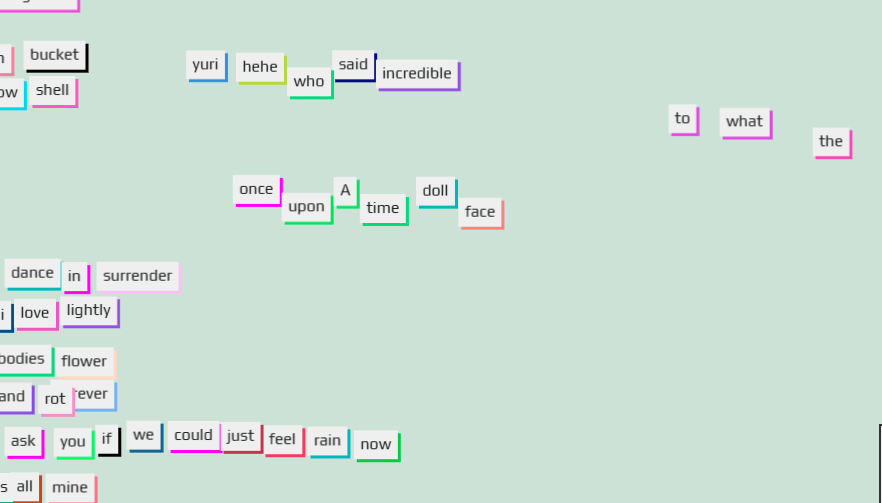
Found this cool library called Playhtml. It lets you drop a few attributes into your HTML to make elements draggable, spinnable, growable, and more, with the state synced live across everyone viewing the page.
One of my favorite demos is the fridge magnets page, it’s a shared magnet poetry board anyone visiting can rearrange in real time.
I help run a bi-weekly algorithm coding guild at work where we solve many programming problems together. It’s a very fun and rewarding experience and I get exposed to many different programming languages. Sometimes, when I “shift gears” between languages, I mix up the prototype methods in javascript.
The one I recently flubbed was shift() and unshift(), which seems silly but when you’re moving fast its an honest mistake to make!
Let’s review their MDN entries
Array.prototype.shift()
Array.prototype.unshift()
How I always remember the difference:
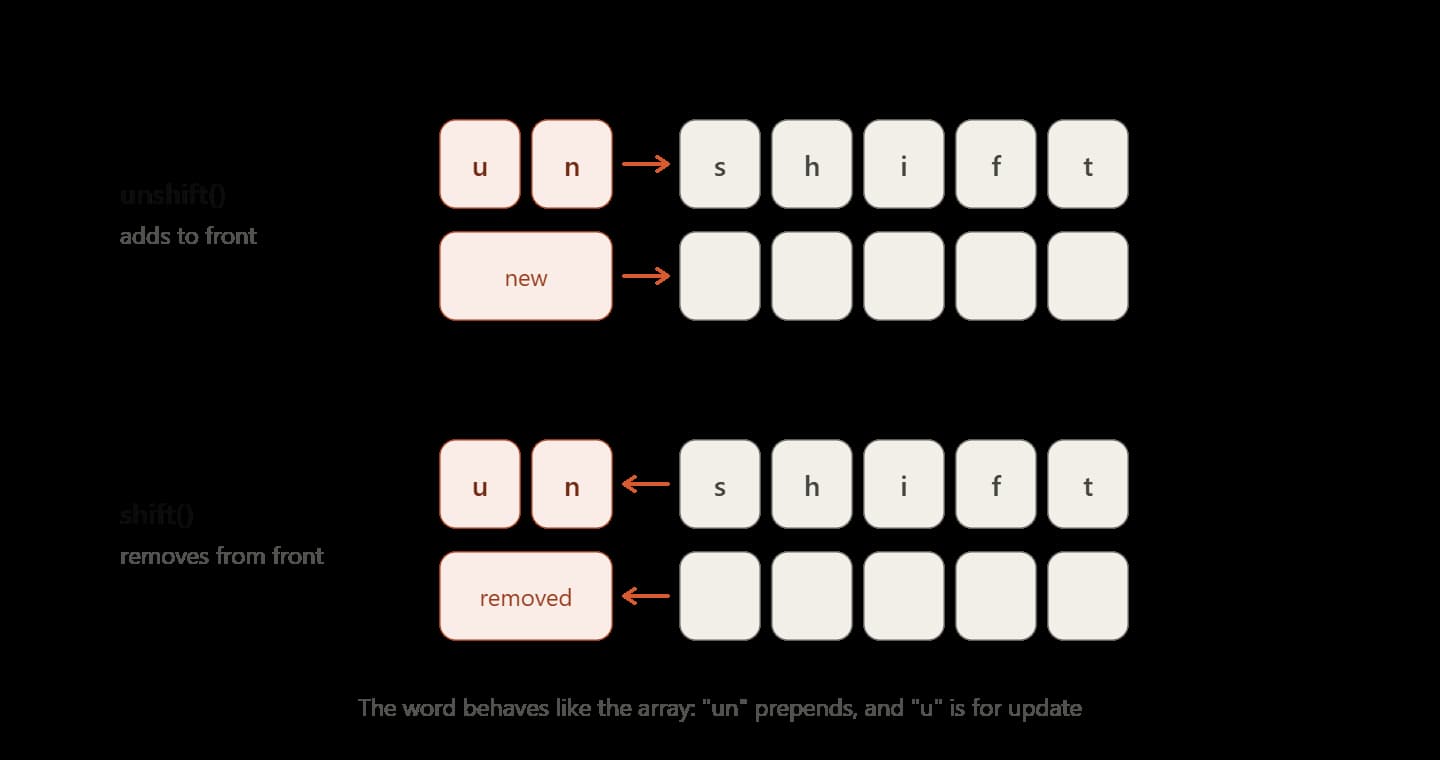
If we literally break up the words into letters (similar to split() lol) you might notice something:
["u","n","s","h","i","f","t"]
// vs
["s","h","i","f","t"]
The way I see it, unshift is “updating” our array above, “shift” with two additional characters in the front (“u” and “n”). In my mind I also remember this by matching up the “u” of update and “u” of unshift. Shift on the other hand complements this as its missing the “u.” In fact this is even how unshift() works! It prepends characters to the front of the array.
Hope this little trick helps you! Remember we update (think “u”) with unshift… with two characters in the front of the word shift > unshift.

See the Pen Bouncing DVD JS logo by Andy Sciro (@spssciro) on CodePen.
Hopefully you know about this bouncing DVD logo screensaver, my mind goes right to watching it in class or seeing it on a bus. Either way over the years its almost become a meme, there’s something just so satisfying about when it hits the corner lol.
Watch it here: Happiness comes from the simple things
(Yes I know the video above is fake, but still thought it really captures the feeling)
With that said, I tried to make it in pixi.js in an afternoon. It surprisingly wasn’t too hard when we utilize pixi.js’s tint api. Essentially though all we need to do is when the logo hits the “wall” just randomly generate a new tint.
If you want to learn more about the tint api you can read more about it here in the docs:
https://scottmcdonnell.github.io/pixi-examples/index.html?s=demos&f=tinting.js&title=Tinting
As always because its on codepen.io so feel free to fork it! You can view the source here, if you want you can replace the logo (it’s a base64 encoded string), because I’m too cheap for codepen premium!!


A few days ago I was trying to make the Javascript logo in photoshop to put onto a blog post banner but couldn’t quite get the font for the logo right. I was playing guessing games with sans-serif fonts but then finally googled it to learn more.

Long story short the font appears to be made by House Industries, its called “NEUTRA TEXT BOLD FONT”
View the font on House Industries
However, throughout my little journey to figure this out I found out some interesting facts about the logo. It was actually kinda cool to see how it came into the community’s possession.
1. It’s a community logo released at JSConf (with love).
So apparently this logo was released in 2011 at JSConf2011, but was used for almost a year and a half prior by the community. The logo lives in Github user voodootikigod’s repo and the community has since contributed various versions, media formats, and tweaks to it.
2. You can use it for anything
On the logo’s Github it states, “We are releasing this under a MIT license so you can print it on anything, use it anywhere, and never have to worry about royalties, licenses, and other such things. So yeah use it for anything! View license here.
3. The font is available here.
In the Logo’s Github pull request history you can see Pull request #5 where there is an HTML/CSS version being created. The discussion on that PR has users trying to identify the font, with that said it’s revealed that the font is “Neutra Text Bold.”
4. My little test… Yes that’s the font for sure 🙂
So I loaded up the font in photoshop alongside the famous Javascript logo and Yep that’s it! Check it out, perfect!
It’s incredible to think that the LANDMARK Javascript release es6 was over 6 years ago (See the official release here)! Javascript and its community have learned a lot since that time, one point of criticism was how HUGE the es6 release was and how difficult it was to learn EVERYTHING. With that said, ES2021 adds a nice digestible set of awesome features coming to your browser soon 🙂 Here are my favorite things being added!
1. String.prototype.replaceAll()
I think this is a really slick feature, hopefully you think the same. Have you ever had to replace some characters in javascript with String.prototype.replace() only to find you had to have a global flag with a regex? Well not anymore, because now with String.prototype.replaceAll(), it’s very straightforward and much more readable.
Let’s go see its MDN entry:
The
String.prototype.replaceAll()method returns a new string with all matches of apatternreplaced by areplacement. Thepatterncan be a string or aRegExp, and thereplacementcan be a string or a function to be called for each match. — MDN
const str = 'Every dog has its dog day.';
console.log(str.replaceAll('dog', 'cat'));
// "Every cat has its cat day."2. Numeric separators
Maybe I think this is cooler than it really is but I think this feature speaks for itself. I used to make a few Javascript games here and there and I feel this would have really helped me back then with some of the values I stored. I do feel though that the hex stuff I will start using today. Overall it’s SOOO much easier to read, I love it.
const budget = 1_000_000_000;
const hex = 0xA0_B0_C0;3. Logical OR assignment operators
This is a slick feature and to understand why it’s so cool is to compare it to the other ways of doing this. Granted ES6 brought us default parameters in functions which I feel this would be a good candidate for (MDN here) using it, but this still has a lot of value in general day-to-day usage of Javascript.
const config = {};
config.timeout ||= 5000;
// config.timeout is now 5000
Also if you like this feature, check out the logical and operator (MDN here).
4. Promise.any()
This is an interesting feature for sure, so what’s a good use case for this? Borrowing from the MDN we get a good idea here…
“This method is useful for returning the first promise that fulfills. It short-circuits/stops after a promise fulfills, so it does not wait for the other promises to complete once it finds one. Unlike
Promise.all(), which returns an array of fulfillment values, we only get one fulfillment value (assuming at least one promise fulfills.”
What’s a good example of using Promise.any()?
In the weekly SPS UI-guild we actually discussed this new feature (BTW always looking for new members, message Chris N about it!). One cool idea that fellow UI-guild member Ken Korth thought of was …
“…you were trying to get an accurate time from a time server and you were trying many time servers, when the first one came back, you could use any because the rest would be canceled…”
Or Imagine we are hitting an API endpoint and what comes back is relatively large/slow like a large MSTR sales report whose data changes infrequently. We could have a cached API and the live data API BOTH go out and whichever API comes back first is displayed to the user. Cool right?
What’s the difference between Promise.race() and this?
There is a very important KEY difference between the two, basically, Promise.any() vs Promise.race come down to how they handle failing Promises.
- Promise.any() – Brings back the first promise, and only one result. Shows failure when all promises fail.
- Promise.race() – Brings back the first promise that succeeds or fails.
const promises = [fetchFromServerA(), fetchFromServerB(), fetchFromServerC()];

Promise.any(promises)
  .then((first) => console.log('First to resolve:', first))
  .catch((error) => console.log('All promises rejected:', error));
And there are even more features coming in the release, notably weakrefs (MDN here). Check out the v8 release notes here for even more info.
Hopefully, you can start to use these features in your daily workflow, and before you know it we’ll have es2022 features. Happy coding!
When I was a kid I received a basic hobby microscope as a birthday present. I think I spent a whole summer where I would look at anything I could get my hands on. Pond water? Sure let’s check it out. A splinter? Yes. How about sand? Yes I did that too, and while it sounds boring sand is actually pretty interesting under the microscope.
Watch: A Grain of Sand - By Dr. Gary Greenberg - Sandgrains.com
With that said the movement of pond water really left an impression on me. Everything was kinda moving around, alive, a whole world that I never knew was so active (especially because I thought of ponds as stinky and stagnant). It turns out what I was so intrigued with as a child was something called Brownian motion. Here’s a vid about it:
Watch: Random Force & Brownian Motion - Sixty Symbols
A bit more about it (taken from Wikipedia). This motion is named after the botanist Robert Brown, who first described the phenomenon in 1827, while looking through a microscope at pollen of the plant Clarkia pulchella immersed in water.
A quick and dirty recreation of Browian movement in Javascript
Long story short I had some fun playing with the incredible PixiJs and trying to recreate Brownian motion. I consider this a “bar napkin doodle” but the effect is pretty convincing.
Check out the live demo on CodePen: Brownian motion (PixiJS) by Andy Sciro (@spssciro)
The key take away here is just randomizing the x and y values for each tick. The line to really watch is simply this:
X = (Math.random() > 0.5 ? 1 : -1) * Math.random() * amp;And voila, we get the right wiggle!
“Wait… normally we lowercase almost all our declarations/LHS in javascript? Why are some functions uppercase?”
Functions are uppercased to communicate to other developers the the new keyword is required. This also applies to JS classes, but remember in JS that classes are just syntatic sugar for constructor functions that operate in the same way.
This is called “the Constructor Invocation Pattern.” Here’s a little more about it in the MDN – New Operator. Also “Javascript: The Good Parts” has a really great writeup about it. Invocation – JavaScript: The Good Parts [Book]
Photo by Markus Spiske on Unsplash
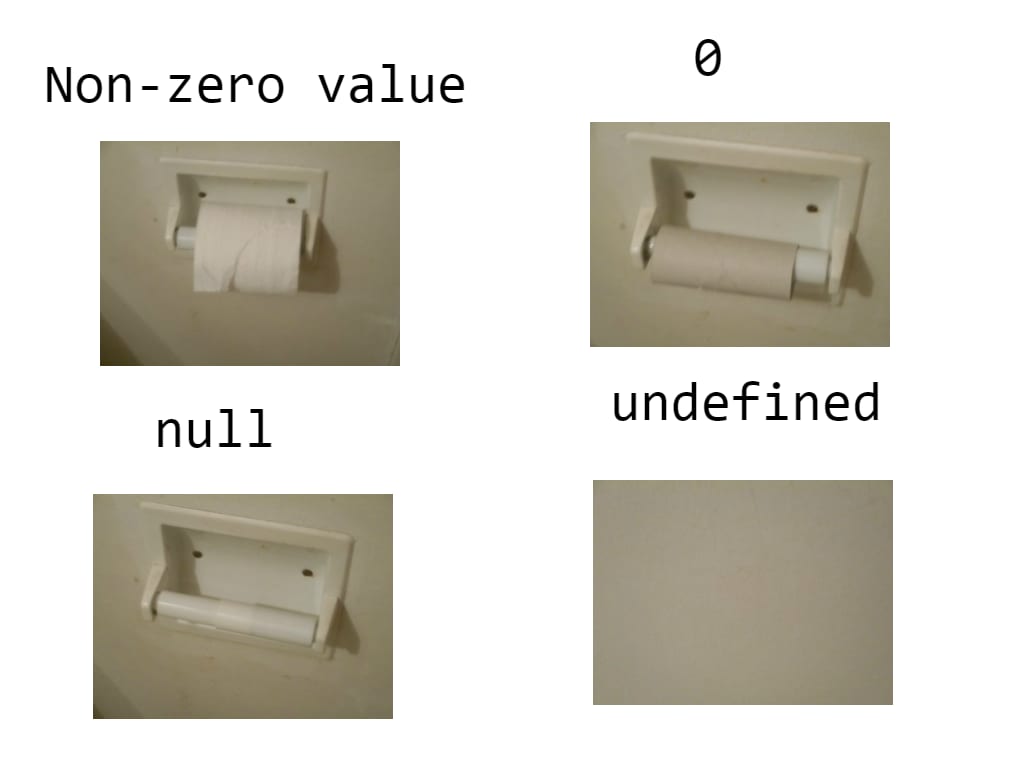
“Emptiness” in javascript sometimes makes me scratch my head. Especially when checking for emptiness. Think I’m crazy? Ask your fellow developers to explain the difference between null + undefined.
What does the MDN say about NULL?
Null: The value
nullrepresents the intentional absence of any object value. It is one of JavaScript’s primitive values and is treated as falsy for boolean operations.
typeof null          // "object" (not "null" for legacy reasons)
typeof undefined     // "undefined"
null === undefined   // false
null  == undefined   // true
null === null        // true
null == null         // true
!null                // true
isNaN(1 + null)      // false
isNaN(1 + undefined) // true
What does the MDN say about Undefined?
Undefined: The global undefined property represents the primitive value undefined. It is one of JavaScript’s primitive types. A variable that has not been assigned a value is of type undefined. A method or statement also returns undefined if the variable that is being evaluated does not have an assigned value. A function returns undefined if a value was not returned.
How about a silly… but really easy to understand image. I found this on stack overflow.
Do you have 15 mins for this video today? I can almost guarantee you that this short, well done video will be worth your time. I have watched and read a lot on the subject (MDN here) but this was just laid out so beautiful and visually.
Yeh its from 2014 but that doesn’t matter – the principles and ideas remain!
Watch on YouTube: What the heck is the event loop anyway? | Philip Roberts | JSConf EU
He’s also very funny 🙂 Check out the transcript here.
“Always bet on Javascript” — Brendan Eich
What can I say about Kyle Simpson? He’s amazing and is a big source of my inspiration for pushing myself to learn more and more about Javascript. Here’s a fantastic talk by him “Keep betting on JS,” that really got me motivated that I am making the RIGHT CHOICE by investing so much time learning Javascript.
Watch it here: Keep Betting on JavaScript by Kyle Simpson · JSCamp Barcelona 2018
Slides are publicly posted here. Check out more about him by reading his bio here on Getify and if you can his FrontEnd Master talks are freaking incredible. Highly recommended to follow him on twitter too.
Photo by Michael Dziedzic on Unsplash

I use the spread operator all day, every day like it’s going out of style. It was such a headslapping moment when I realized it can work on strings too — not sure if useful, but still pretty cool.
One thing I didn’t know was it’s not just for arrays and objects. Check out the Spread syntax (…) docs on MDN — how did I miss it?
So what does MDN say?
“Spread syntax (…) allows an iterable such as an array expression or string to be expanded in places where zero or more arguments (for function calls) or elements (for array literals) are expected, or an object expression to be expanded in places where zero or more key-value pairs (for object literals) are expected.”
So that means you can do something like this:
const str = "hello";
const chars = [...str];
// ["h", "e", "l", "l", "o"]
I’m not sure when I’ll actually need to use this over split(), but it’s still cool to know about it.